Hero MotoCorp - Dealership Onboarding
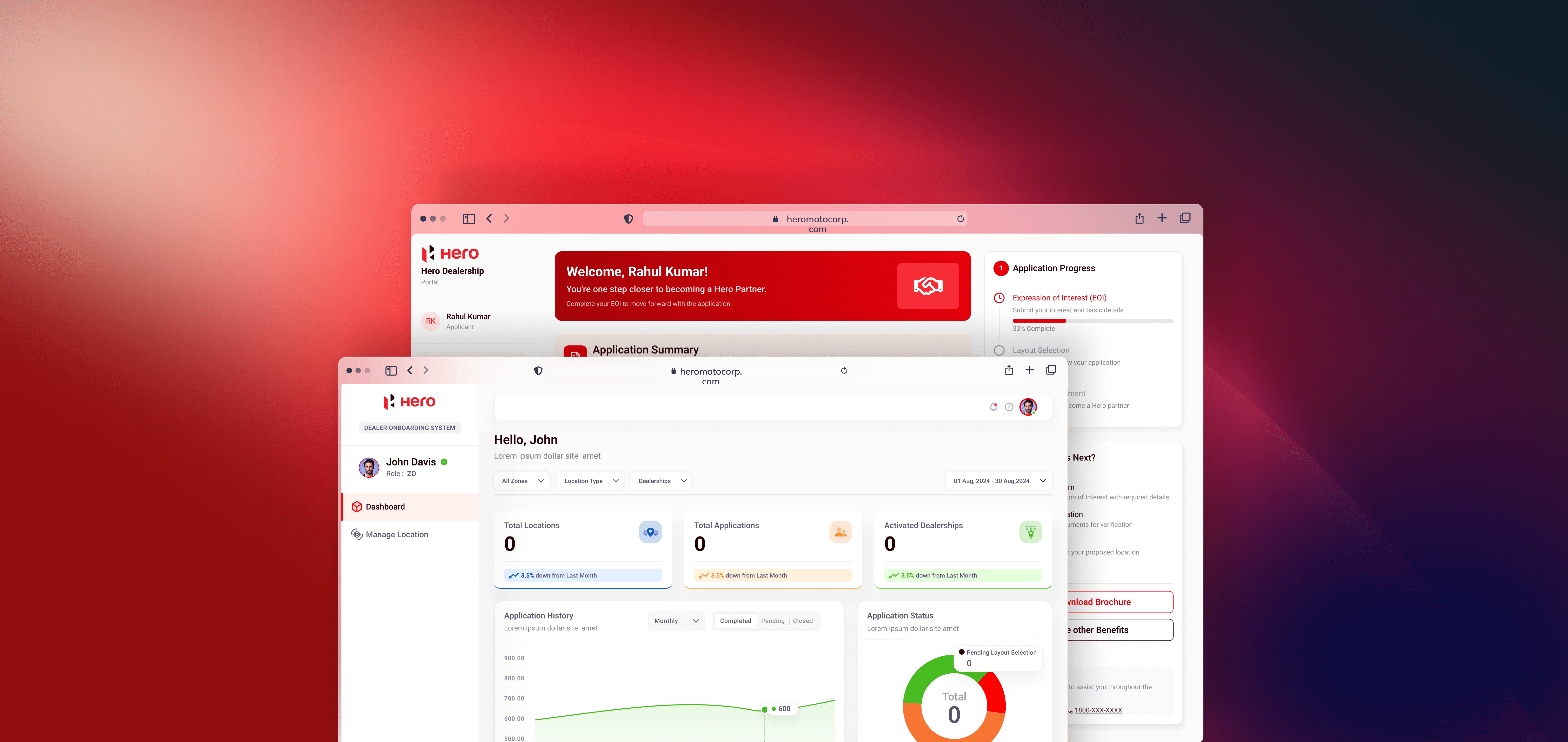
This project was for Hero MotoCorp to design a dealership onboarding system. The workflow had multiple levels: Zonal Office (ZO) created a location ID, Touchpoint Office (TO) generated multiple application IDs linked to that location, Area Office (AO/ASM) approved or rejected applications, and finally, the Customer Account Department (CAD) verified details before notifying the customer to log in and complete their dealership registration.
The aim of the project was to digitize this multi-level process and create an interface that allowed smooth coordination between internal teams and customers. The design had to be delivered within one month, and development began in parallel to save time
Client
Hero MotoCorp
Services
Dashboard Design
Industry
Two Wheeler
Timeline
1 Month
Challenges
One of the key challenges was the complexity of the multi-level approval system. Each role had different permissions, and it was important to avoid confusion while switching between location IDs and application IDs.
The second challenge was the short timeline of one month, which left little room for multiple design iterations.
Another challenge was ensuring that the customer-facing side of the flow was straightforward, since customers would only come into the system after all internal approvals.
Solutions
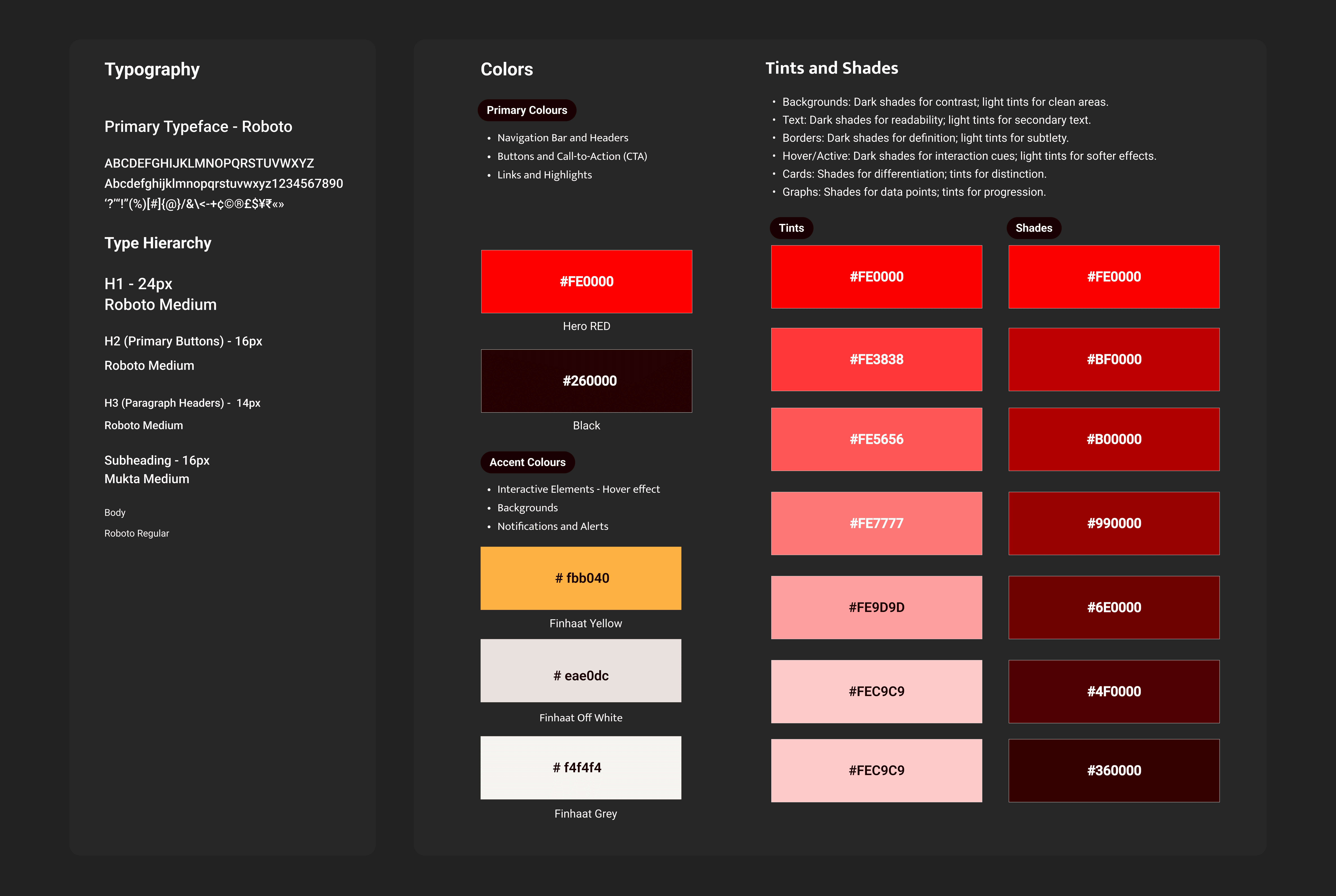
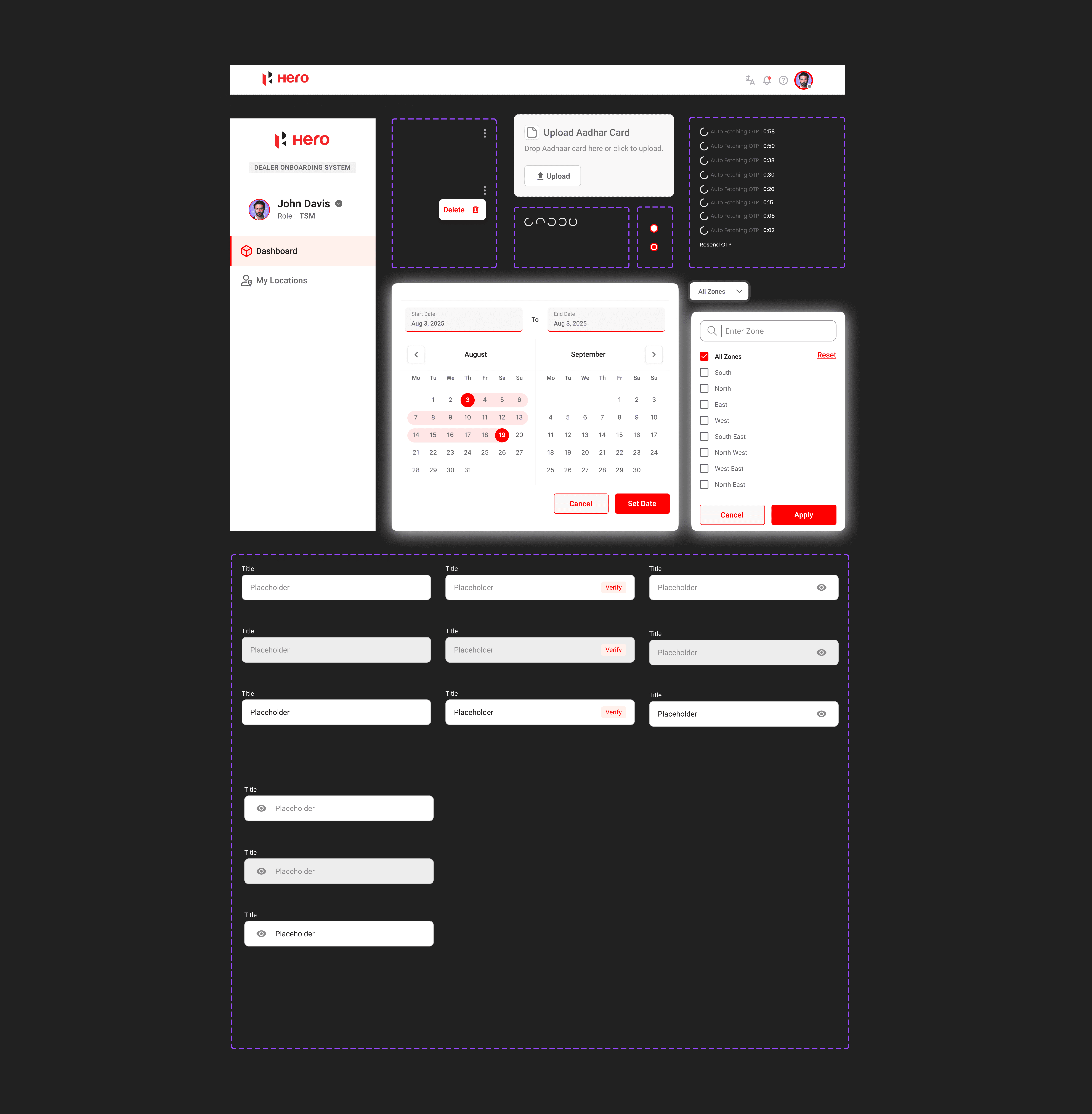
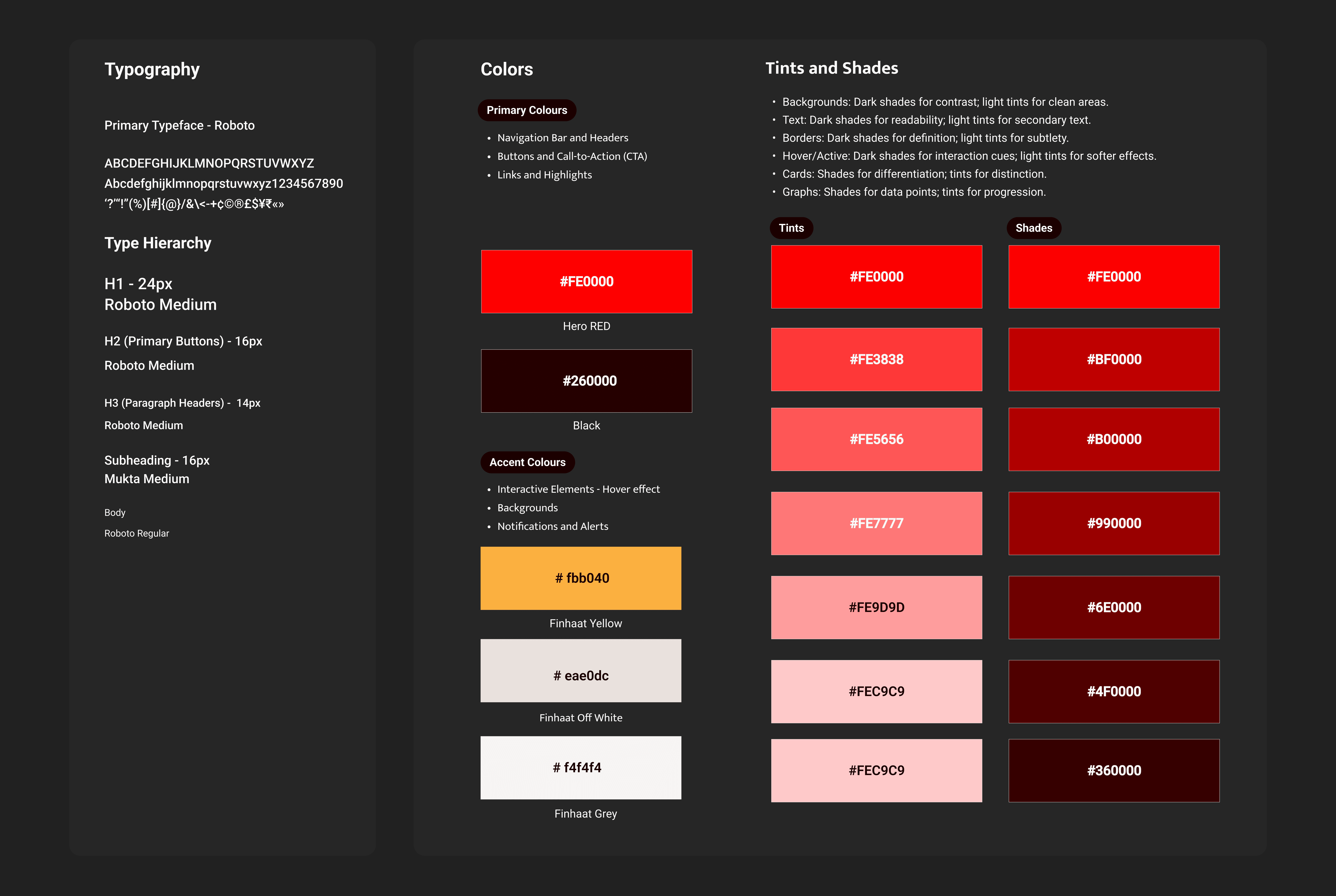
To address the lack of guidelines, we created a lightweight design system early in the project. For the short timeline, designs were shared in smaller batches, allowing quicker reviews and approvals. To resolve gaps during development, I worked with QA to track issues and delivered missing designs quickly.
Design Process
1. Understanding the Workflow
The project began with a meeting at the client’s office where the Tech Department head explained the dealership onboarding process in detail. Since the delivery timeline was just one month, I focused on understanding the critical steps first and aligning with the client on what needed to be designed within this period
- 001
2. Designing Role-Based Interfaces
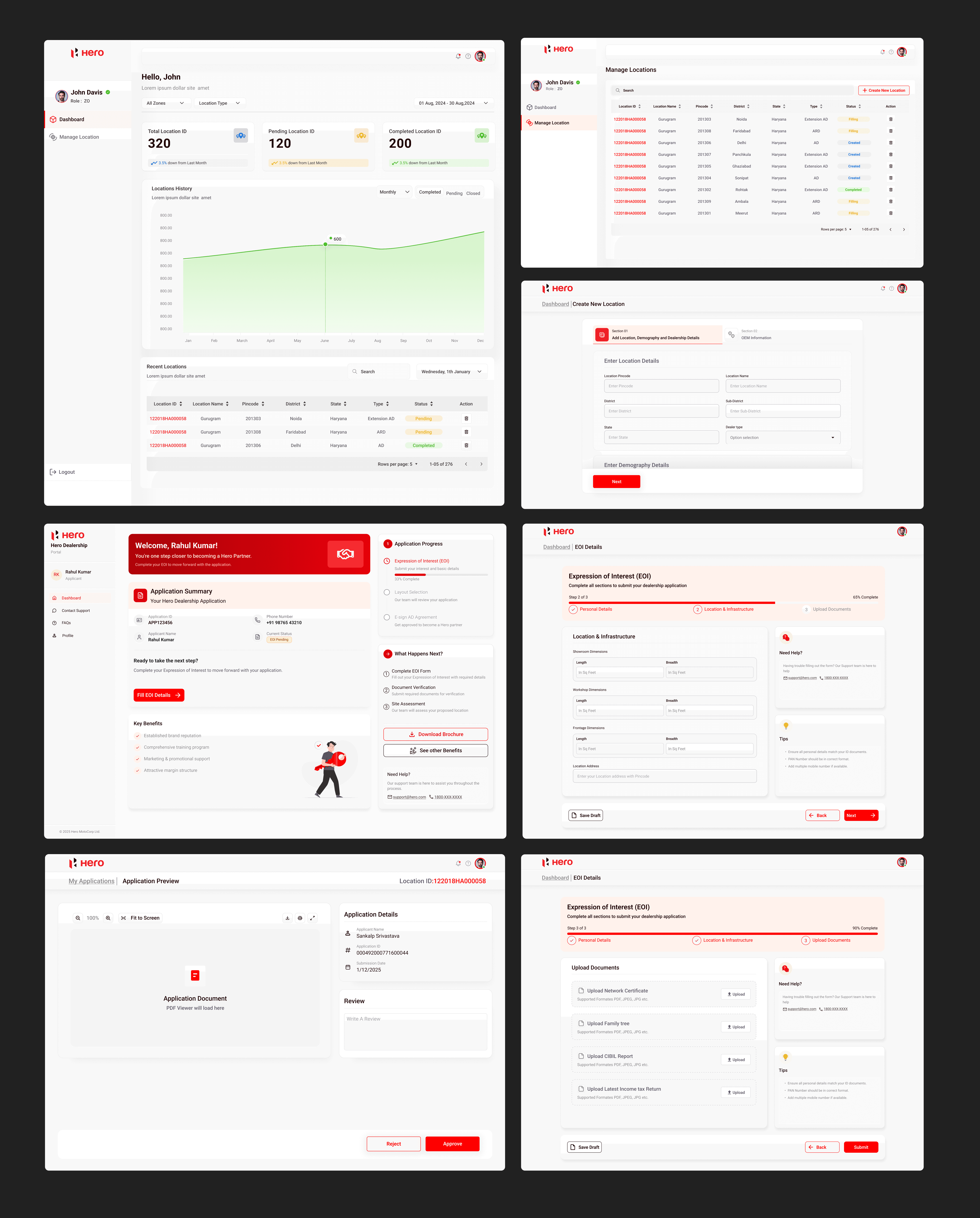
I directly moved into high-fidelity designs, creating clear interfaces for each role in the workflow—Zonal Office, Touchpoint Office, Area Office, and CAD. Each screen was designed to show only the actions relevant to that role, which kept the system structured and easy to follow.
- 002
3. Daily Reviews with Client
Using Figma we designed high-fidelity wireframes focusing on flow and hierarchy. I collaborated closely with frontend developers throughout ,aligning on feasibility early to reduce back-and-forth during dev handoff.
- 003
4. Final Delivery
By the end of the month, the complete design set was delivered. The system provided a streamlined way for offices to manage applications and for customers to complete their part of the registration without confusion. The client appreciated the smooth communication and timely delivery.
- 004
Design System
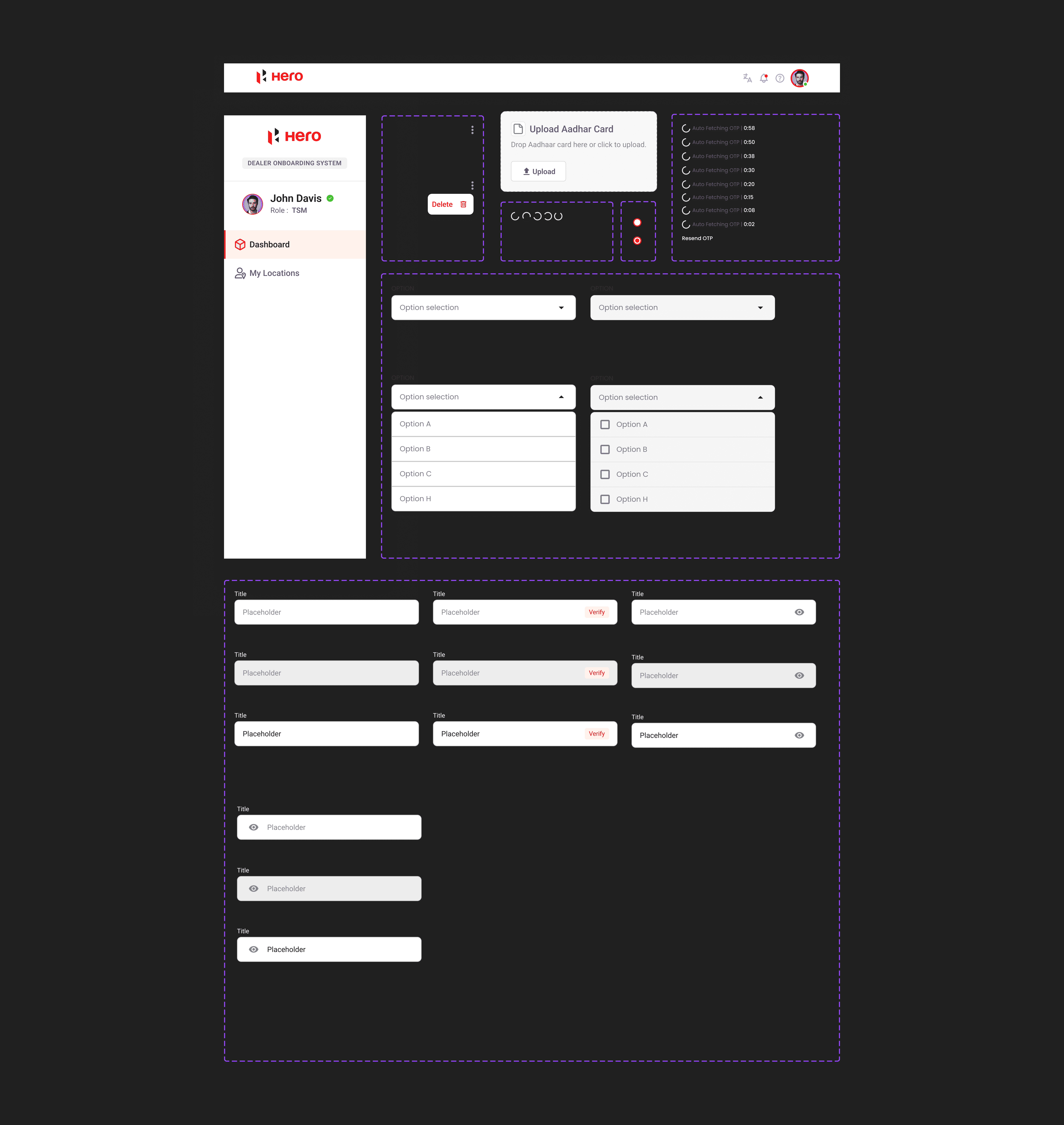
Components
Final Designs
Final Outcome
The project was completed within the one-month deadline, and the dealership onboarding system provided a clear, step-by-step workflow for both internal offices and customers. The design helped bring structure to a complex approval process, while making the customer’s part of the journey simple and direct. For me, the project was an important experience in handling enterprise-level workflows, balancing multiple user roles, and coordinating closely with developers under a short delivery schedule.
Hero MotoCorp - Dealership Onboarding
This project was for Hero MotoCorp to design a dealership onboarding system. The workflow had multiple levels: Zonal Office (ZO) created a location ID, Touchpoint Office (TO) generated multiple application IDs linked to that location, Area Office (AO/ASM) approved or rejected applications, and finally, the Customer Account Department (CAD) verified details before notifying the customer to log in and complete their dealership registration.
The aim of the project was to digitize this multi-level process and create an interface that allowed smooth coordination between internal teams and customers. The design had to be delivered within one month, and development began in parallel to save time
Client
Hero MotoCorp
Services
Dashboard Design
Industry
Two Wheeler
Timeline
1 Month
Challenges
One of the key challenges was the complexity of the multi-level approval system. Each role had different permissions, and it was important to avoid confusion while switching between location IDs and application IDs.
The second challenge was the short timeline of one month, which left little room for multiple design iterations.
Another challenge was ensuring that the customer-facing side of the flow was straightforward, since customers would only come into the system after all internal approvals.
Solutions
To handle the complexity, I mapped the user flow in detail before starting design, so each role’s responsibilities were clearly defined. This minimized overlap and made the UI role-specific.
To meet the timeline, I worked in parallel with developers and shared design screens in batches, so they could start building without waiting for the entire set.
For the customer side, I simplified the login and form-filling flow, ensuring only necessary information was requested at this stage, making the process less overwhelming for first-time users.
Design Process
1. Understanding the Workflow
The project began with a meeting at the client’s office where the Tech Department head explained the dealership onboarding process in detail. Since the delivery timeline was just one month, I focused on understanding the critical steps first and aligning with the client on what needed to be designed within this period
- 001
2. Designing Role-Based Interfaces
I directly moved into high-fidelity designs, creating clear interfaces for each role in the workflow—Zonal Office, Touchpoint Office, Area Office, and CAD. Each screen was designed to show only the actions relevant to that role, which kept the system structured and easy to follow.
- 002
3. Daily Reviews with Client
As I was working from the client’s office, I shared progress with them on a daily basis. This gave me quick feedback and helped me make adjustments immediately, instead of waiting for long review cycles. The continuous feedback loop made the design process smoother and kept everyone aligned.
- 003
4. Final Delivery
By the end of the month, the complete design set was delivered. The system provided a streamlined way for offices to manage applications and for customers to complete their part of the registration without confusion. The client appreciated the smooth communication and timely delivery.
- 004
Design System
Components
Final Designs
Final Outcome
The project was completed within the one-month deadline, and the dealership onboarding system provided a clear, step-by-step workflow for both internal offices and customers. The design helped bring structure to a complex approval process, while making the customer’s part of the journey simple and direct. For me, the project was an important experience in handling enterprise-level workflows, balancing multiple user roles, and coordinating closely with developers under a short delivery schedule.
Components
Final Designs
Final Outcome
The project was completed within the one-month deadline, and the dealership onboarding system provided a clear, step-by-step workflow for both internal offices and customers. The design helped bring structure to a complex approval process, while making the customer’s part of the journey simple and direct. For me, the project was an important experience in handling enterprise-level workflows, balancing multiple user roles, and coordinating closely with developers under a short delivery schedule.